LinkLine Developer Guide
Acknowledgements
This project is based on the AddressBook-Level 3 project created by the SE-EDU initiative.
Setting up, getting started
Refer to the guide Setting up and getting started.
Design
Architecture
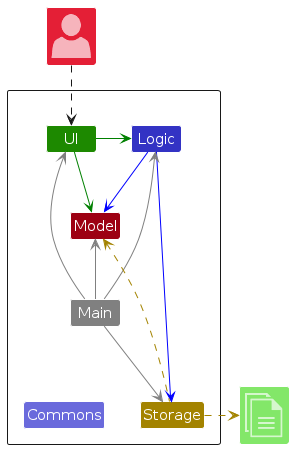
The Architecture Diagram given above explains the high-level design of the App.
Given below is a quick overview of main components and how they interact with each other.
Main components of the architecture
Main (consisting of classes Main and MainApp) is in
charge of the app launch and shut down.
- At app launch, it initializes the other components in the correct sequence, and connects them up with each other.
- At shut down, it shuts down the other components and invokes cleanup methods where necessary.
The bulk of the app's work is done by the following four components:
UI: The UI of the App.Logic: The command executor.Model: Holds the data of the App in memory.Storage: Reads data from, and writes data to, the hard disk.
Commons represents a collection of classes used by multiple other components.
How the architecture components interact with each other
The Sequence Diagram below shows how the components interact with each other for the scenario where the user issues
the command delete 1.
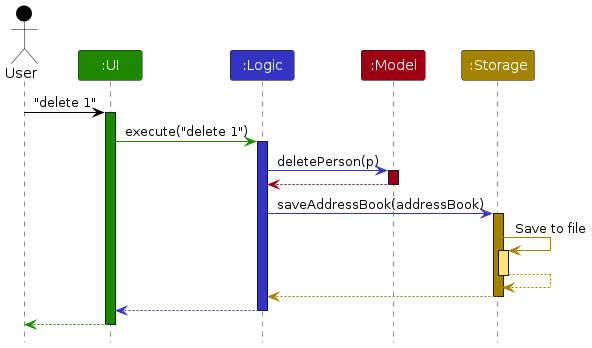
Each of the four main components (also shown in the diagram above),
- defines its API in an
interfacewith the same name as the Component. - implements its functionality using a concrete
{Component Name}Managerclass (which follows the corresponding APIinterfacementioned in the previous point.
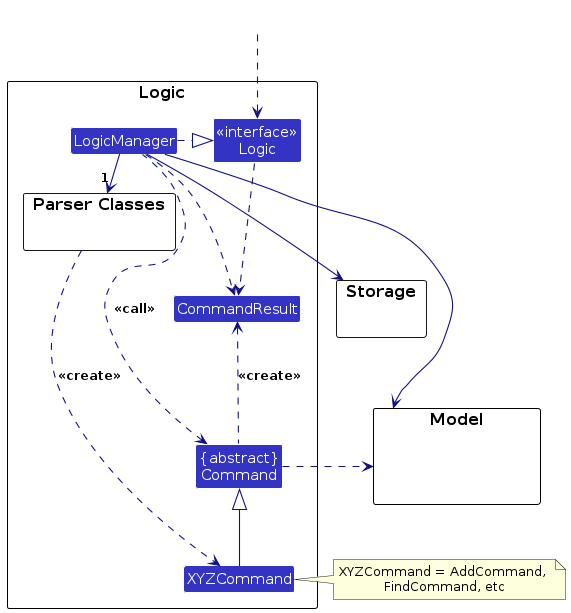
For example, the Logic component defines its API in the Logic.java interface and implements its functionality using
the LogicManager.java class which follows the Logic interface. Other components interact with a given component
through its interface rather than the concrete class (reason: to prevent outside component's being coupled to the
implementation of a component), as illustrated in the (partial) class diagram below.
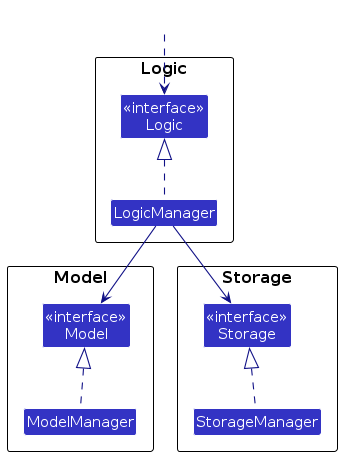
The sections below give more details of each component.
UI component
The API of this component is specified in Ui.java
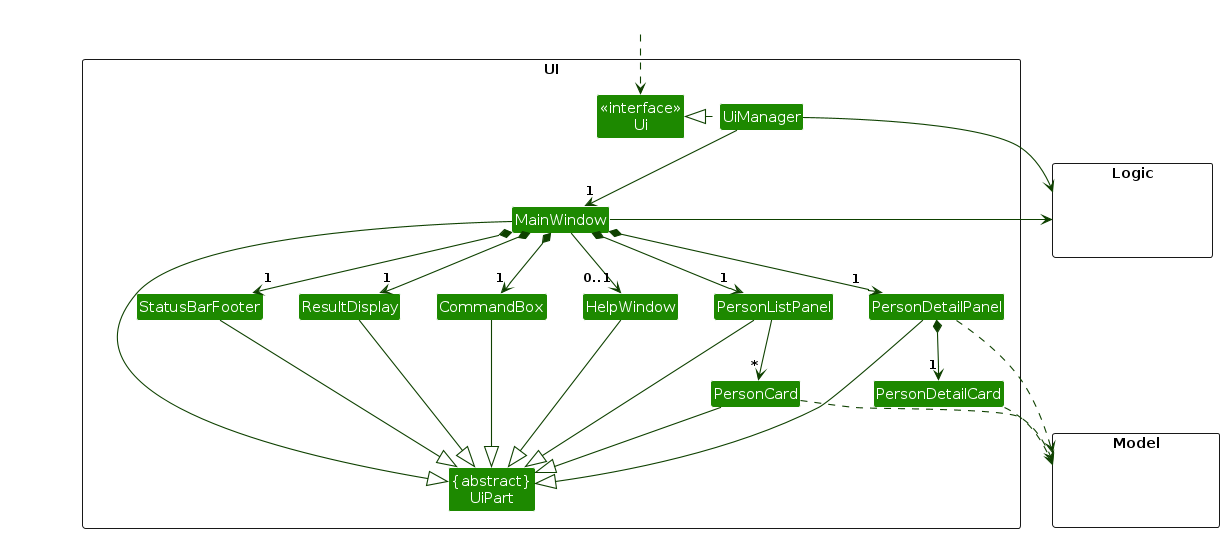
The UI consists of a MainWindow that is made up of parts e.g.CommandBox, ResultDisplay, PersonListPanel,
StatusBarFooter etc. All these, including the MainWindow, inherit from the abstract UiPart class which captures
the commonalities between classes that represent parts of the visible GUI.
The UI component uses the JavaFx UI framework. The layout of these UI parts are defined in matching .fxml files that
are in the src/main/resources/view folder. For example, the layout of the MainWindow
is specified in MainWindow.fxml
The UI component,
- executes user commands using the
Logiccomponent. - listens for changes to
Modeldata so that the UI can be updated with the modified data. - keeps a reference to the
Logiccomponent, because theUIrelies on theLogicto execute commands. - depends on some classes in the
Modelcomponent, as it displaysPersonobject residing in theModel.
Logic component
API : Logic.java
Here's a (partial) class diagram of the Logic component:
The sequence diagram below illustrates the interactions within the Logic component, taking execute("delete 1") API
call as an example.
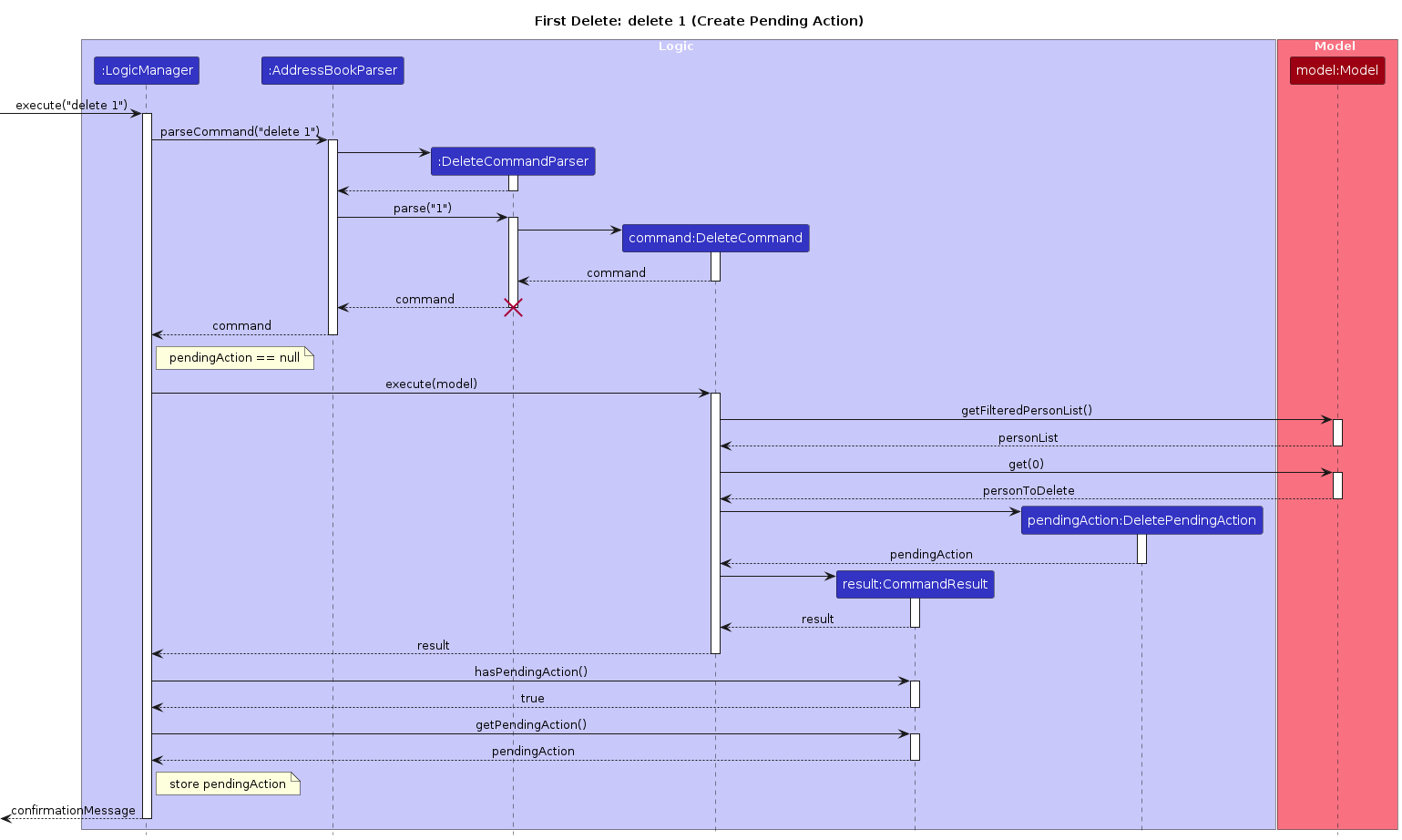
Note: The lifeline for DeleteCommandParser should end at the destroy marker (X) but due to a limitation of
PlantUML, the lifeline continues till the end of diagram.
How the Logic component works:
- When
Logicis called upon to execute a command, it is passed to anAddressBookParserobject which in turn creates a parser that matches the command (e.g.,DeleteCommandParser) and uses it to parse the command. - This results in a
Commandobject (more precisely, an object of one of its subclasses e.g.,DeleteCommand) which is executed by theLogicManager. - The command can communicate with the
Modelwhen it is executed (e.g. to delete a client).
Note that although this is shown as a single step in the diagram above (for simplicity), in the code it can take several interactions (between the command object and theModel) to achieve. - The result of the command execution is encapsulated as a
CommandResultobject which is returned back fromLogic.
Here are the other classes in Logic (omitted from the class diagram above) that are used for parsing a user command:
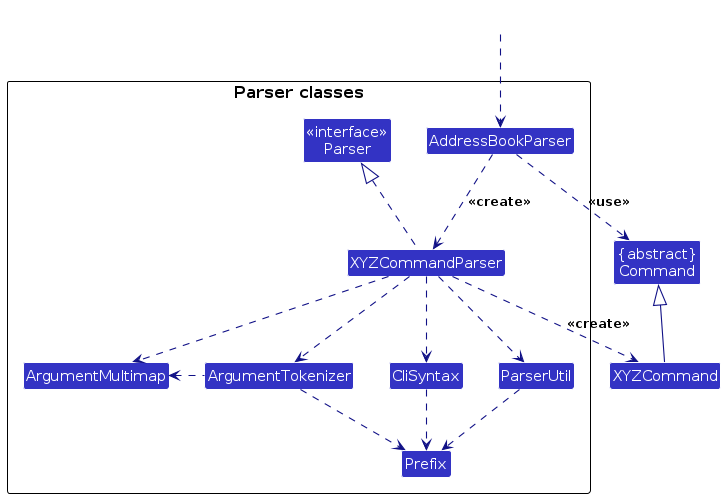
How the parsing works:
- When called upon to parse a user command, the
AddressBookParserclass creates anXYZCommandParser(XYZis a placeholder for the specific command name e.g.,AddCommandParser) which uses the other classes shown above to parse the user command and create aXYZCommandobject (e.g.,AddCommand) which theAddressBookParserreturns back as aCommandobject. - All
XYZCommandParserclasses (e.g.,AddCommandParser,DeleteCommandParser, ...) inherit from theParserinterface so that they can be treated similarly where possible e.g, during testing.
Model component
API : Model.java
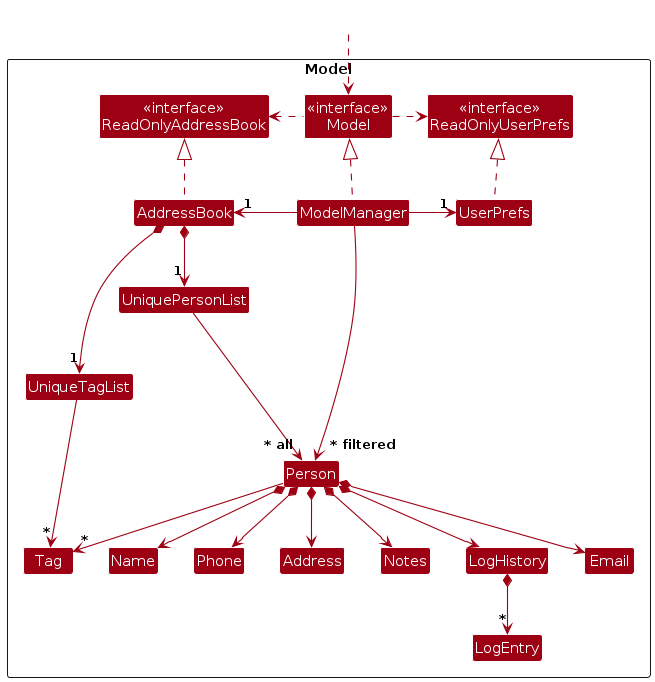
The Model component,
- stores the address book data i.e., all
PersonandTagobjects (which are contained inUniquePersonListand aUniqueTagListobjects respectively). - stores each
Person'sLogHistory, which contains zero or moreLogEntryrecords. - stores the currently 'selected'
Personobjects (e.g., results of a search query) as a separate filtered list which is exposed to outsiders as an unmodifiableObservableList<Person>that can be 'observed' e.g. the UI can be bound to this list so that the UI automatically updates when the data in the list change. - stores a
UserPrefobject that represents the user’s preferences. This is exposed to the outside as aReadOnlyUserPrefobjects. - does not depend on any of the other three components (as the
Modelrepresents data entities of the domain, they should make sense on their own without depending on other components)
Storage component
API : Storage.java
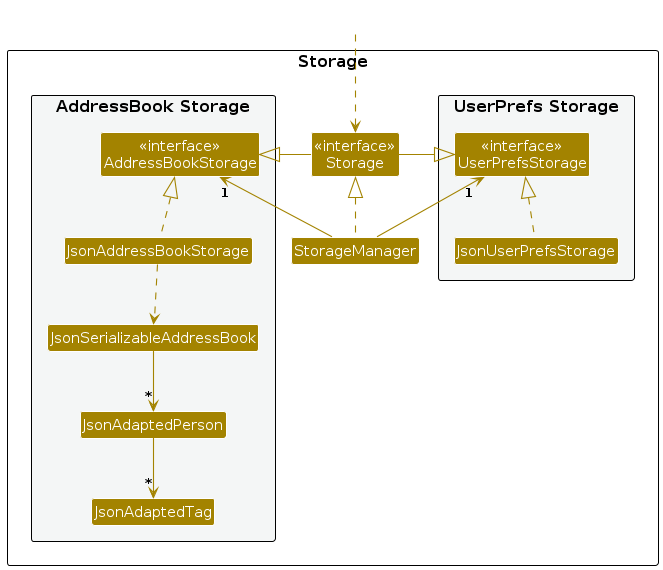
The Storage component,
- can save both address book data and user preference data in JSON format, and read them back into corresponding objects.
- inherits from both
AddressBookStorageandUserPrefStorage, which means it can be treated as either one (if only the functionality of only one is needed). - depends on some classes in the
Modelcomponent (because theStoragecomponent's job is to save/retrieve objects that belong to theModel)
Common classes
Classes used by multiple components are in the seedu.address.commons package.
Implementation
This section describes some noteworthy details on how certain features are implemented.
Field validation constraints
Implementation
Field-level validation is enforced in the model layer (Name, Phone, Email, Address, Tag, Notes) and reused
by parsers via ParserUtil.
All user-provided values are trimmed in ParserUtil before validation.
| Field | Constraint summary |
|---|---|
Name | 1 to 100 printable characters, and cannot be blank (Name#VALIDATION_REGEX). |
Phone | Must contain 3 to 15 digits in total; spaces and hyphens are allowed only between digit groups (Phone#VALIDATION_REGEX). |
Email | Enforces a stricter local-part@domain format where local-part and domain labels follow explicit character rules (Email#VALIDATION_REGEX). |
Address | Must not be blank (first non-whitespace character required). |
Tag | 1 to 50 printable characters, and cannot be blank (Tag#VALIDATION_REGEX). |
Notes | Optional free text with max length 200 characters (Notes#MAX_LENGTH). |
This keeps validation centralized and consistent for both command execution and JSON deserialization.
Documentation, logging, testing, configuration, dev-ops
Appendix: Requirements
Product scope
Target user profile:
- is a solo (one-person) residential on-site service technician (e.g., aircon cleaning / handyman / appliance servicing)
- manages repeat customers and needs fast recall of client contact + exact service-location details
- often works from a laptop/desktop between jobs and prefers a fast, typing-first workflow
- can type quickly and prefers keyboard shortcuts / CLI-style commands over mouse-heavy interactions
- needs to store service-location context to avoid mistakes on-site
Value proposition: A fast, typing-first address book that helps solo residential service technicians avoid mistakes and wasted time by keeping client contact details tightly coupled with service-location context, searchable in seconds.
User stories
Priorities: High (must have) - * * *, Medium (nice to have) - * *, Low (unlikely to have) - *
| Priority | As a … | I want to … | So that I can… |
|---|---|---|---|
* * * | solo residential service technician | add a new client with name, phone, email, and service address details | record the exact contact details and service-location details |
* * * | solo residential service technician | delete a client record | remove one-off customers who are not likely to become repeat customers |
* * * | solo residential service technician | find a client by name | locate the correct client quickly |
* * * | solo residential service technician | view a list of clients stored | get an overview of my business |
* * * | solo residential service technician | keep data in a human-editable local file that the app can load | access client information between sessions |
* * | solo residential service technician | update a client's contact details | keep client records accurate when details change |
* * | solo residential service technician | have the list view sorted by name (lexicographic order) | quickly skim the list to find certain clients |
* * | solo residential service technician | find a specific client's details quickly (e.g., by typing part of an address) | retrieve the correct client even if I don't remember their name |
* * | solo residential service technician | add special requirements or precautions specified by each client | avoid mistakes and prepare properly before a visit |
* * | solo residential service technician | see a compact view when listing clients and view full details only when I select a client | scan my list quickly without losing access to details |
* * | solo residential service technician | copy a client's service address to the clipboard | paste it quickly into maps or other apps |
* * | solo residential service technician | append a timestamped service note to a client's record as a visit log | track what was done previously and follow up correctly |
* * | solo residential service technician | sort the contact list by most recent interaction | prioritize clients I worked with recently |
* * | solo residential service technician | attach tags to a client | recognize customer types or service types at a glance |
* * | solo residential service technician | filter clients by tag | narrow down to the relevant subset |
* * | solo residential service technician | see a "Today's Visits" list when I tag clients with a date and remove them from the list when done | manage my daily visits quickly |
* | new user | start with sample data on first launch | understand how the app is supposed to look without entering everything first |
* | solo residential service technician | be prompted by the app when I want to delete a client with service history | avoid accidentally losing important past records |
* | solo residential service technician | group tags into larger categories | categorize clients and services more systematically |
* | solo residential service technician | update or rename a tag globally (cascading) | keep my tagging consistent when I change my conventions |
* | solo residential service technician | delete a tag globally (cascading) | keep my tagging consistent when I change my conventions |
* | solo residential service technician | pin frequent clients to a "Favorites" quick-access list | view my regular clients with a single command |
* | solo residential service technician | store multiple service locations under one client | handle clients who have more than one address (e.g., home + property) |
* | solo residential service technician | set one service location as the default | quickly use the most common address without extra steps |
* | solo residential service technician | record the brand and model of an appliance for a client | prepare the right tools or parts before visiting |
* | solo residential service technician | see the list of clients visited within a certain time period | manage clients based on loyalty or recency |
* | solo residential service technician | set a warranty end date for a specific repair | know whether a follow-up is still under warranty |
* | solo residential service technician | archive or hide inactive clients | reduce clutter while keeping records for reference |
* | solo residential service technician | clear all data | reset the app completely when needed (e.g., for demo or testing) |
* | solo residential service technician | be warned when adding a client that looks like a duplicate | avoid creating repeated records accidentally |
* | solo residential service technician | merge two client records | combine duplicates into a single correct record |
* | solo residential service technician | import clients from other files into my existing list | bring over contacts from older tools or files quickly |
* | solo residential service technician | undo or redo recent actions | recover from mistakes quickly |
{More to be added}
Use cases
(For all use cases below, Linkline is the system, and the user is the sole Actor, unless specified otherwise)
Use Case: UC01 - Add new client
System: Linkline Actor: user Guarantees:
- The number of clients is either unchanged (unsuccessful) or incremented (successful).
MSS
userrequests to add a client.userfills in the details (name, phone, email, address, with optional tag and notes field) of the client on the CLI.Linklinecreates a new client, inserts them into the list in lexicographical order by name and displays the details on the GUI.- Use case ends.
Extensions
- 2a. Name provided is invalid by criteria given in feature specification.
Linklinereturns error message informinguserwhat criteria the name must meet.- Use case ends.
- 2b. Phone number provided is invalid by criteria given in feature specification.
Linklinereturns error message informinguserwhat criteria the phone number must meet.- Use case ends.
- 2c. Email address provided is invalid by criteria given in feature specification.
Linklinereturns error message informinguserwhat criteria the email address must meet.- Use case ends.
- 2d. Address provided is invalid by criteria given in feature specification.
Linklinereturns error message informinguserwhat criteria the address must meet.- Use case ends.
- 2e. Tag provided is invalid by criteria given in feature specification.
Linklinereturns error message informinguserwhat criteria the tag must meet.- Use case ends.
- 2f. Notes provided is invalid by criteria given in feature specification.
Linklinereturns error message informinguserwhat criteria the notes must meet.- Use case ends.
- 2g. Duplicate client detected (same phone number or email as an existing client).
Linklinereturns an error message informing the user that a client with the same phone number or email already exists.- Use case ends.
Use Case: UC02 - Search for a client
System: Linkline Actor: user
MSS
userspecifies one or multiple fields (name, phone number, email address, physical address, tags) with one or multiple keywords per field as a search query.Linklineuses the query provided to search and list (lexicographically by name) the clients who have at least one field match successfully against the specified fields (This search is done only against the currently filtered clients).- Use case ends.
Extensions
- 1a. The search command does not specify any field.
Linklinegives a warning touserthat command entered is in an invalid format.- Use case ends.
- 1b. The search command has at least one specified field with no keywords (is empty).
Linklinegives a warning touserthat command entered is in an invalid format.- Use case ends.
Use Case: UC03 - Copy client address to clipboard.
System: Linkline Actor: user
MSS
userrequests to copy a client's address by specifying the client's index.Linklinecopies the client's address to the system clipboard.userpastes the address into their desired application (e.g., maps).- Use case ends.
Extensions
- 1a. The index given is invalid (not a positive integer or out of range).
Linklinereturns an error message informing the user that the index is invalid.- Use case ends.
- 2a.
Linklinefails to access the system clipboard.Linklinereturns an error message informing the user to copy the address manually from the details view.usersearches for the client (UC02) and copies the address manually from the displayed details.- Use case ends.
Use Case: UC04 - Change client phone number
System: Linkline Actor: user
MSS
useredits a client's detail viaLinklinecommand by specifying their index and new phone number, and re-sorts the list to maintain lexicographical order.Linklinedisplays new fields of the updated client.- Use case ends.
Extensions
- 1a. The index given is invalid, and does not point to a client.
Linklinereturns an error that informsuserthe index given is invalid.- Use case ends.
- 2a. Provided phone number is same as phone number of another client.
Linklinereturns error message informinguserthat the phone number is already in use.- Use case ends.
Use Case: UC05 - Delete a client
System: Linkline Actor: user
MSS
userenters delete command with the index of the target client.Linklinedisplays the client's details and ask for confirmation.userenters the same delete command again.Linklinedeletes the client and confirms the deletion.- Use case ends.
Extensions
- 1a. The index given is invalid (not a positive integer or out of range).
Linklinereturns an error message showing that the input index is invalid to theuser.- Use case ends.
- 2a.
userenters any other command instead of confirming.Linklinecancels the pending deletion and executes the new command normally.- Use case ends.
Use Case: UC06 - List Clients
System: Linkline Actor: user
MSS
userrequests to view all client added inLinklinevia command.Linkelineshows list with all clients sorted lexicographically by name.- Use case ends.
Extensions
- 1a. There are no client added yet.
Linklinereturns an error message to reminduserto add at least one client before listing them.- Use case ends.
Use Case: UC07 - View client detail
System: Linkline Actor: user
MSS
userconfirms personal detail of a specific client viaLinklineby specifying the index of target client.Linklineshows full details of the client including name, phone, email, full address and precautions.- Use case ends.
Extensions
- 1a. The index given is invalid (not a positive integer or out of range).
Linklinereturns an error message showing that the input index is invalid to theuser.- Use case ends.
Use Case: UC08 - Edit existing client details
System: Linkline Actor: user
MSS
useredit client detail by adding new tag(s) or/and notes viaLinklineby specifying client index, tag content or/and notes content.Linklinedisplays new fields of the updated client.- Use case ends.
Extensions
- 1a. The index given is invalid (not a positive integer or out of range).
Linklinereturns an error message showing that the input index is invalid to theuser.- Use case ends.
- 1b. No field is provided.
Linklinereturns an error message to informuseradding at least one field.- Use case ends.
- 1c. A tag provided is invalid according to the feature specification.
Linklinereturns an error message informinguserof the tag naming rules.- Use case ends.
Use Case: UC09 - Filter clients by tags
System: Linkline Actor: user
MSS
userenters one or multiple keywords as a filter query.Linklineuses the query provided to filter and list (lexicographically) the clients who have the specified tags that match the query.- Use case ends.
Extensions
- 1a. The filter query does not match against any of the clients' tags.
Linklinereturns an empty page that informsuserno matching clients were found.- Use case ends.
- 1b. No filter query was provided.
Linklinereturns error message informinguserthat at least one word must be provided as a filter query.- Use case ends.
- 1c. Filter query provided is invalid by criteria given in feature specification.
Linklinereturns error message informinguserwhat criteria the query must meet.- Use case ends.
Use Case: UC10 - Rename a tag
System: Linkline Actor: user
MSS
userrequests to rename an existing tag to a new name.Linklinerenames the tag in the global tag list.Linklineupdates all clients currently having the old tag to reflect the new tag name.- Use case ends.
Extensions
- 1a. The target tag name does not exist in
Linkline.Linklinereturns an error message informing theuserthat the tag was not found.- Use case ends.
- 1b. The new tag name already exists in
Linkline.Linklinereturns an error message informing theuserthat the new tag name is a duplicate.- Use case ends.
Use Case: UC11 - Delete a tag
System: Linkline Actor: user
MSS
userrequests to delete a specific tag by tag name.Linklinedisplays the specified tag name and ask for confirmation.userenters the same delete tag command again.Linklineremoves the tag from the global tag list.Linklineremoves the tag from all clients with that tag name.- Use case ends.
Extensions
- 1a. The tag name provided does not exist.
Linklinereturns an error message informing theuserthat the tag was not found.- Use case ends.
- 2a.
userenters any other command instead of confirming.Linklinecancels the pending deletion and executes the new command normally.- Use case ends.
Non-Functional Requirements
- Portability: Should work on any mainstream OS as long as it has Java
17or above installed. - Capacity & Performance: Should be able to hold up to 1000 clients without a noticeable sluggishness in performance for typical usage.
- Usability (Efficiency): A user with above average typing speed for regular English text (i.e. not code, not system admin commands) should be able to accomplish most of the tasks faster using commands than using the mouse.
- Data Integrity (Duplicate Prevention): The system must prevent duplicate client entries by enforcing uniqueness on normalized phone number and normalized email address. An attempt to add or edit a client resulting in a duplicate must be rejected with a clear error message.
- Data Persistence (Safety): All data-modifying commands (
add,delete,edit) must trigger an automatic save to the local JSON file. The save mechanism must use a safe write strategy (e.g., write to temp file then rename) to prevent data corruption in case of a system crash during write. - Fault Tolerance (Load Failure): If the data file is missing, corrupted, or in an invalid format on startup, the application must not crash.
- Performance (Command Response): Every user command that does not modify data (e.g., find, list, view) should display the result within 500 milliseconds for a database of up to 1000 clients.
- Performance (Startup Latency): The application should be ready for user input within 3 seconds on a standard hardware configuration (e.g., a laptop from the last 5 years) with a dataset of up to 500 clients.
- Usability (Learnability): A first-time user who has never used a command-line interface before should be able to understand the basic workflow (add, list, find) within 10 minutes, aided by sample data and a comprehensive help command.
- Consistency (User Experience): The application must strictly adhere to the command format, parameter rules, and error messages defined in the functional specification to ensure a predictable and reliable user experience.
- Constraint (Scope): The system is designed exclusively for a solo technician. Features requiring multi-user access, cloud synchronization, or network communication are explicitly out of scope for the MVP.
- Constraint (Storage Format): Data persistence is limited to a human-editable JSON file. No external database systems (e.g., MySQL, PostgreSQL) shall be used.
- Accessibility (Error Clarity): All error messages must be user-friendly and actionable, specifying exactly what went wrong and how to correct it, rather than displaying technical stack traces or cryptic codes.
Glossary
- Client / Person: The primary entity in Linkline. Mandatory fields include Name, Phone, Email, and Address. Optional fields include Tags and Notes.
- CLI (Command Line Interface): A text-based interface where the user interacts with the application by typing commands rather than using a mouse.
- Compact View: A display mode in the GUI where client records are shown with limited information (name and phone only), allowing the user to scan many records at once without excessive scrolling.
- Duplicate Client: Two clients are considered duplicates if they share the same normalized phone number or normalized email address.
- Full View: A details panel (or an expanded display mode) where all information for a specific client (name, phone, email, full address, tags and notes) is visible to the user.
- JSON (JavaScript Object Notation): The lightweight, text-based data format used by the Storage component to persist data to the hard disk.
- Mainstream OS: Widely used operating systems like Windows, Linux, Unix, MacOS
- Service-Location Context: Precise physical details about a client's address (e.g., precise address, access instructions, precautions, or special requirements) critical for an on-site technician.
- Solo Technician: The target user of the app.
Appendix: Instructions for manual testing
Given below are instructions to test the app manually.
Note: These instructions only provide a starting point for testers to work on; testers are expected to do more exploratory testing.
Launch and shutdown
Initial launch
Download the jar file and copy into an empty folder
Double-click the jar file Expected: Shows the GUI with a set of sample contacts. The window size may not be optimum.
Saving window preferences
Resize the window to an optimum size. Move the window to a different location. Close the window.
Re-launch the app by double-clicking the jar file.
Expected: The most recent window size and location is retained.
Deleting a client
Deleting a client while all clients are being shown
Prerequisites: List all clients using the
listcommand. Multiple clients in the list.Test case:
delete 1
Expected: Expected: No client is deleted. Confirmation message with the client's details is shown. Status bar remains the same. Pending deletion state is set for index 1.Test case:
delete 1(immediately after the above)
Expected: First contact is deleted from the list. Details of the deleted contact shown in the status message. Timestamp in the status bar is updated.Test case:
delete 1thenlistthendelete 1
Expected: Firstdelete 1shows confirmation.listcancels the pending deletion. Seconddelete 1shows confirmation again (not auto-deleted).Test case:
delete 0
Expected: No client is deleted. Error details shown in the status message. Status bar remains the same.Other incorrect delete commands to try:
delete,delete x,...(where x is larger than the list size)
Expected: Similar to previous.